Grid Docking Station for POE-Jack Android Player & Touchscreens | Desktop Mount & I/O Expansion | POEJK-DOCK1
Grid Docking Station for POE-Jack Android Player & Touchscreens | Desktop Mount & I/O Expansion | POEJK-DOCK1
Available to order — ships from incoming stock
Typically ships in 2–5 Business Days (Western Canada) · 3–6 Business Days (Eastern Canada)
SKU:POEJK-DOCK1
Docking Station for POE-Jack Android Player & Touchscreens
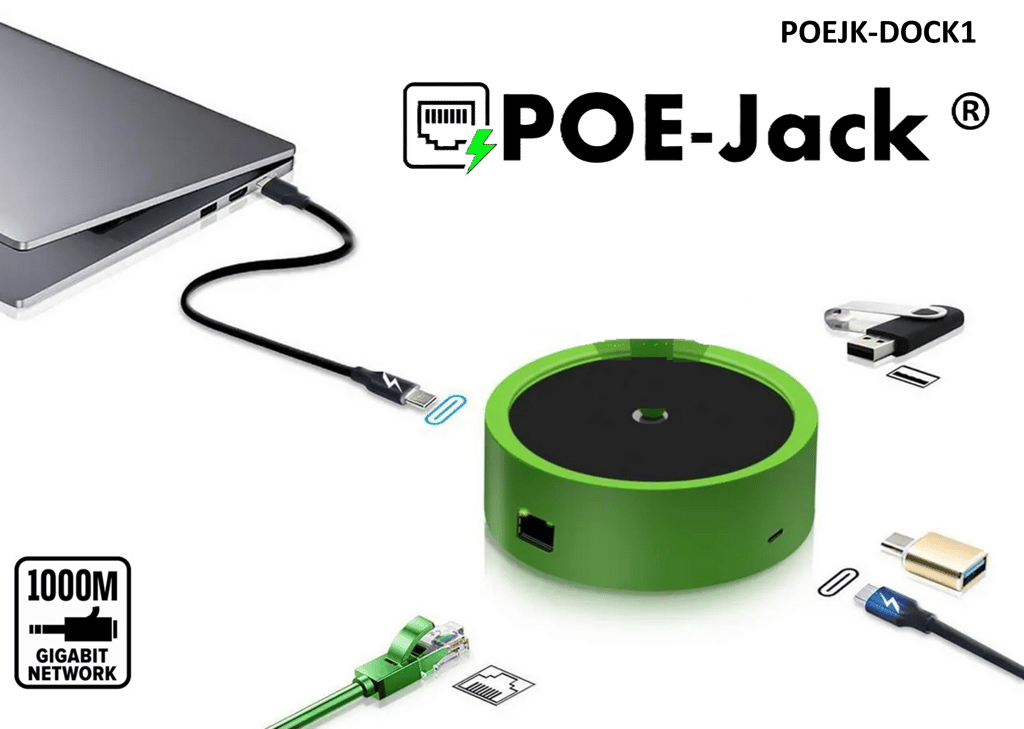
The POEJK-DOCK1 is a docking station for the POE-Jack Android Player and POEJK-TOUCH10 touchscreens, turning them into comfortable desktop or countertop devices. It provides a stable stand and I/O expansion so you can treat POE-Jack panels like small PoE-powered tablets instead of strictly wall devices.
Use it wherever you want a POE-Jack Android interface on a desk—reception, network operations, labs, meeting rooms—while keeping a single low-voltage Ethernet cable for power and connectivity.
Key features
- Docking station for POE-Jack endpoints – designed for the POEJK-DS1 Android Player and POEJK-TOUCH10 touchscreens (white and black).
- Desktop mount / stand – lets you deploy POE-Jack panels on a desk, credenza or counter instead of in-wall.
- I/O expansion – provides a docking interface for cabling and device connections, simplifying plug-in at the desktop.
- Cleaner cable management – routes network and peripheral cables through the dock rather than directly into the display edge.
Technical highlights
| Parameter | Value |
|---|---|
| Model | POEJK-DOCK1 |
| Product type | Docking Station |
| Primary use | Desktop mount & I/O expansion for POE-Jack Android Player & touchscreens |
| Typical devices | POEJK-DS1, POEJK-TOUCH10-WH, POEJK-TOUCH10-BK |
Ideal applications
- Reception or lobby check-in screens powered by POEJK-DS1 or POEJK-TOUCH10.
- Network or building-operations dashboards on a desk instead of a wall.
- Meeting-room control panels where a tabletop form factor is preferred.
- Demo and lab environments where POE-Jack Android devices are frequently moved or re-configured.
Compatibility & ecosystem
POEJK-DOCK1 is part of the GRID Networking accessory family and is intended for use with POE-Jack Android devices. It complements the PoE infrastructure (switches, Active POE-Jack in-wall switches and structured cabling) by giving you more ergonomic mounting options without introducing additional AC adapters.
Install & design notes
- Place the dock on a stable, flat surface near your PoE cabling.
- Dock the POEJK-DS1 or POEJK-TOUCH10 following the latest GRID mounting guidance for the device.
- Route the Ethernet cable and any required peripheral connections through the dock to keep the desktop tidy.
Canada-ready checklist
- ✓ Ideal for Canadian offices, reception desks and service counters that use POE-Jack Android interfaces.
- ✓ Reduces the need for extra AC outlets on work surfaces by staying within the PoE ecosystem.
Specifications are subject to change without notice. Confirm details with the latest GRID documentation before design or tender.